

Key takeaways
- Off-the-shelf software is the right default when your process is standard and speed matters more than fit.
- Custom software pays off when the way you work is part of your edge, or when workarounds cost real time every week.
- Compare cost over three to five years, not only the first invoice. Licences, add-ons and workarounds all add up.
- You do not have to choose all at once. Start with one painful workflow, prove the value, then grow from there.
Every growing business reaches the same fork in the road: buy a ready-made product and adapt your process to it, or build software around the way you actually work. Both are legitimate choices. The expensive mistake is picking one out of habit, or because of whoever pitched most recently, instead of by what your operation needs.
This guide gives you a plain way to decide. It covers what each option really means, five questions that settle most cases, and a short checklist you can take into your next planning meeting.
What each option really means
Off-the-shelf software
Off-the-shelf software is a finished product sold to many customers. You subscribe or buy a licence, configure the settings, and your team adapts to how the product works. It is usually quick to start, and the vendor carries the maintenance and the roadmap.
The trade-off is fit. You get the workflows the vendor designed for the average customer. Anything beyond that comes through add-ons, integrations or workarounds.
Custom software
Custom software is designed and built for your organization. The screens, rules and integrations follow your process, and you decide what gets built first. It takes longer to start and needs a clear brief, but nothing is included that you do not need, and nothing essential is missing.
The right question is not “build or buy?” It is “which parts of our work deserve software that fits them exactly?”
Five questions that decide it
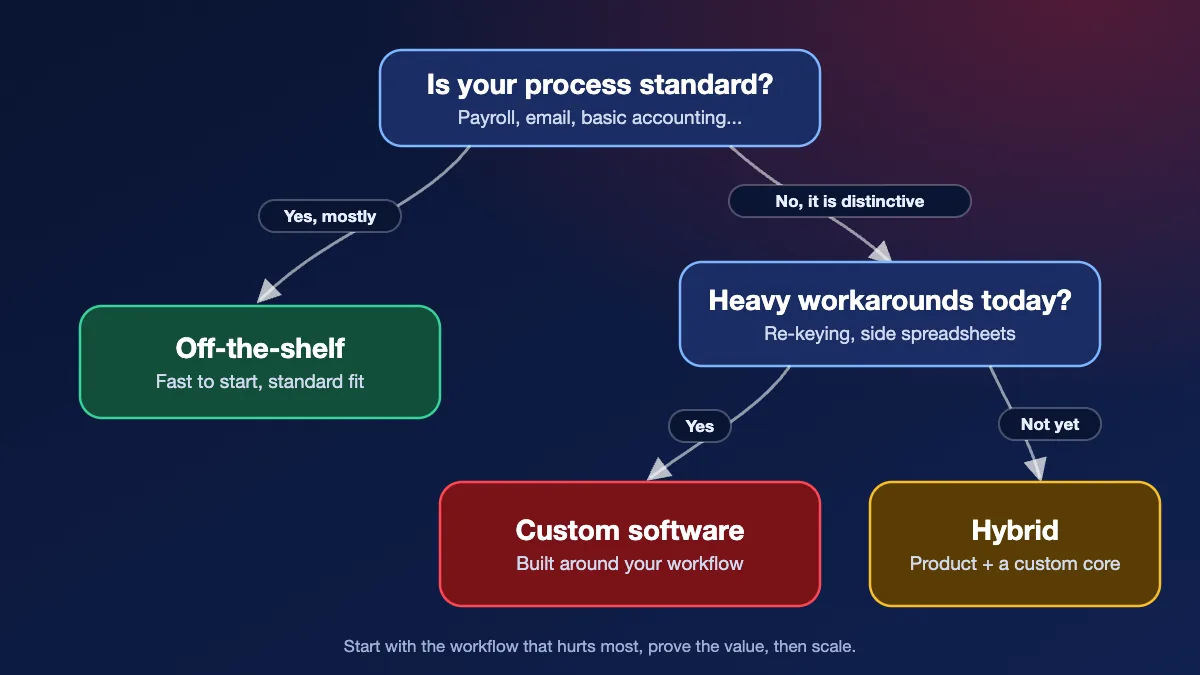
- Is the process standard or distinctive? Payroll, email and basic accounting work the same way for almost everyone. Dispatching your own fleet, scheduling your own field teams or pricing your own products may not. The more distinctive the process, the stronger the case for custom.
- How many workarounds do you run today? If staff re-key data between systems, keep side spreadsheets or repeat the line “the tool cannot do that”, you are already paying for the gap every week. Count the hours before you decide.
- What does it have to connect to? A product that does not talk to your other systems creates manual work. Check what each option can integrate with, and what it costs to maintain those connections.
- Who should own the roadmap? With a product, the vendor decides what changes and when. With custom software, you do. That matters most when the software supports something customers notice.
- How fast do you need to be live? If the answer is “next month”, a packaged product usually wins. If you can phase the work, a focused first release of custom software can arrive sooner than most people expect.
Side-by-side comparison
| Factor | Off-the-shelf | Custom software |
|---|---|---|
| Time to start | Days to weeks | Weeks to months, depending on scope |
| Fit to your process | Good for standard needs, partial otherwise | Built around your workflow |
| Upfront cost | Lower | Higher |
| Cost over time | Recurring fees, add-ons and workarounds | Maintenance and planned improvements |
| Integration | Depends on what the vendor supports | Designed in from the start |
| Control of the roadmap | The vendor’s | Yours |
| Main risk | Paying for features you do not use, or missing ones you need | Unclear scope or a weak brief |
Per-user licences grow with your team. Add-ons, connectors and the staff time spent on workarounds rarely appear in the first quote. Add them up over three to five years before you compare totals.
When off-the-shelf is the right call
Choose a packaged product when most of these are true:
- The need is common, such as accounting, email, HR or a basic CRM.
- You want to be running within days or weeks.
- Your team is willing to adjust its process to the product.
- The vendor already integrates with the systems you rely on.
- The software is not something your customers see or compare you on.
Buy the jobs that look the same in every organization. E-signature, asset tracking and meeting room booking are usual examples. Spend a custom budget only on the workflow a product cannot match.
When custom software pays off
Custom software earns its cost when:
- Your process is part of what makes you competitive, and a generic tool would flatten it.
- Staff spend hours each week on re-keying, spreadsheets or manual hand-offs.
- You need several systems to work together in a way no product supports.
- You have outgrown a tool, and each new requirement means another workaround.
- Customers or partners use the software directly, and the experience matters.
Those conditions show up more often in industry workflows than in generic office work. Healthcare, banking and financial services, manufacturing, logistics, retail and e-commerce, education, government and utilities, and automotive and dealerships each have processes a packaged product was not designed for. Email, payroll and accounting in those same organizations should still be bought.
A middle path: start small
The choice is rarely all or nothing. Many organizations keep a standard product for the commodity parts of the business and build custom software only for the workflow that sets them apart. Others begin with a single, narrowly scoped build, the one workflow that hurts most, release it, measure the result, and extend from there.
That is how we approach projects at Acesoft: start small, prove the value, then scale. It keeps the first investment modest and gives you evidence before you commit to more.
The piece you build can stay narrow. Field staff may need mobile app development. Finance and operations teams often need SAP connected to the tools they already use, or process automation for steps people still do by hand. Questions over your own documents may call for custom AI development, a generative AI assistant or an AI agent for one repeated task. In regulated work, the gap is often fraud detection or a healthcare AI workflow rather than a new platform.
If the limit is people, IT staff augmentation or dedicated AI engineers can extend the team you have. Phone support and data entry can stay with contact centre services and back-office outsourcing. Keep custom software for the part that has to fit.
Modernization is a third route. It moves an existing system forward in stages instead of replacing it in one risky step. See our application modernization service.
A simple decision checklist
Lean towards off-the-shelf if
- the process is standard and well served by existing products
- speed matters more than a perfect fit
- you can accept the vendor’s roadmap
- the total cost over several years is clearly lower
Lean towards custom if
- the process is distinctive, or customers see the software
- workarounds already cost real hours every week
- integration between systems is central to the work
- you want control over what changes and when
What to prepare before you talk to a vendor
A short brief makes any conversation more useful, whichever way you lean. Gather:
- the two or three workflows you most want to improve, described in plain words
- who uses them today, and roughly how many people
- the systems that must connect, and any data that must move between them
- constraints such as privacy rules, approvals or compliance requirements
- a realistic budget range and the date you would like to be live
If artificial intelligence is part of the idea, an AI strategy conversation can separate a useful first use from a project that is too broad. If you would like a second opinion, you can talk to a solution architect. We will help you work out whether custom software is the right fit before anything is built.
Published November 2, 2026.
